
API Integration (Advanced)
API Setup
Generate Wall ID and API Keys
Before writing any code, you’ll need to use the self-guided setup process in the RevU portal to create an offerwall placement and and get your API keys.
Access the Publisher Portal: log in and open the Offerwall tab. Contact your account manager if you need account credentials.
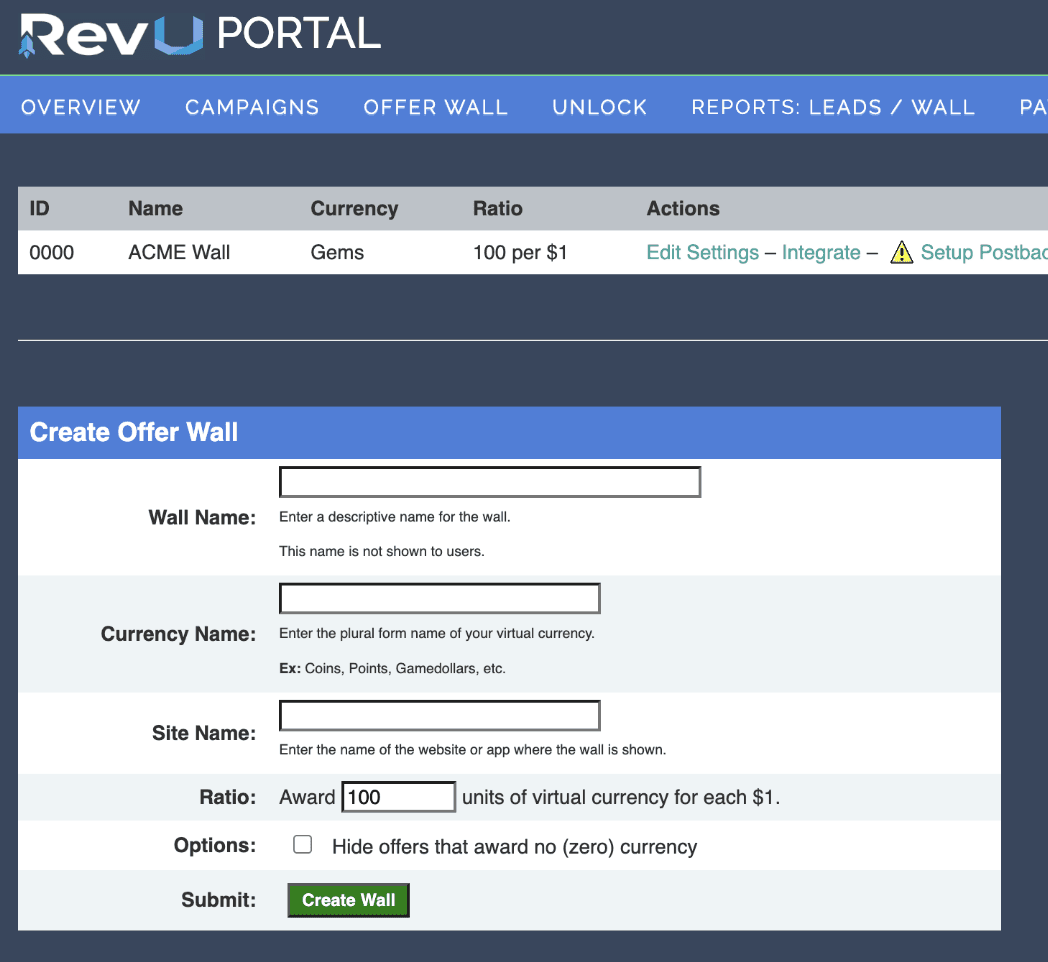
Create a New Wall: Fill out the creation form to define your currency name and reward ratio.
Note your Offerwall ID: Once created, your unique ID will appear in the leftmost column of the dashboard. You’ll need this for making API calls.
Publisher account API key: Get Offers requires your account key, available in the Publisher Portal under My Account > Account API Key, together with the wall ID. It is separate from a wall-specific key.
Other integrations: Get Progress and Get Personalized do not require or validate an API key; both use the wall ID and user ID. Keep wall-specific keys for integrations that explicitly require them.
Postback Configuration (Server-to-Server)
Postbacks allow RevU to notify your server when a user completes an offer. When a completion event is detected, RevU sends an HTTP GET request to an endpoint you define, passing event details as URL parameters. This allows your system to credit users automatically without any client-side interaction.
Postbacks are also referred to as S2S, server pixel, callback, or closed loop notifications depending on your platform.
Postback Setup
Access the Publisher Portal: log in and open the Offerwall tab.
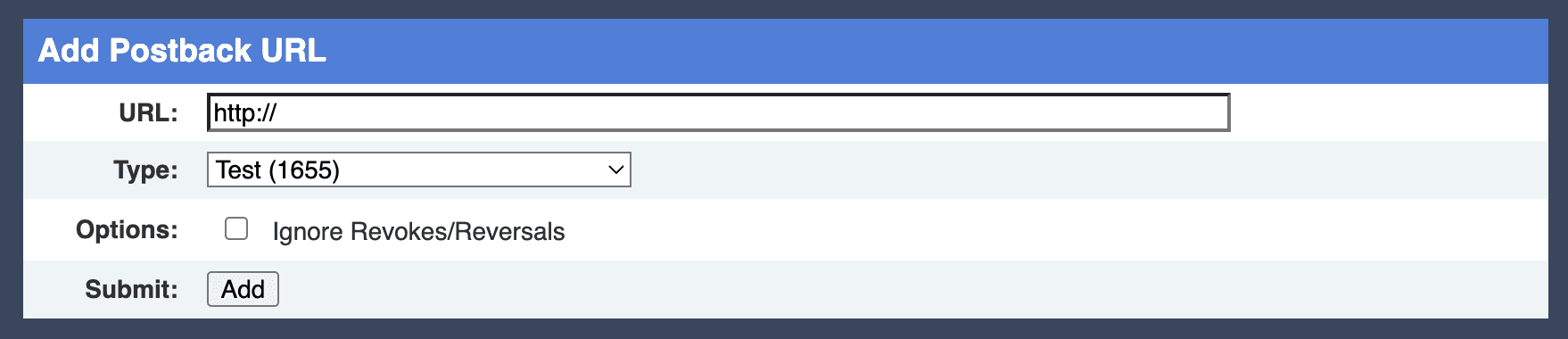
Setup Postback: Click the Setup Postback link to define your Postback URL.
Postback URL Format
Your postback URL should include the variables you want RevU to populate, defined using the placeholder syntax below. RevU will replace each placeholder with the corresponding value at the time the postback is fired.
$uid$ identifies the user. $sid$ carries the original SID, which for offerwall traffic includes the wall placement identifier and is not the user’s ID.
Important
If you are setting up a postback for a specific offer wall's virtual currency, don't forget to select a type (deployment) from the dropdown list before adding the URL.
Variables
Variable | Description |
|---|---|
| The campaign ID number of the offer being posted. |
| The name of the offer being posted. |
| The commission earned (i.e, 5.75). If the offer is being reversed, this will be a negative number (i.e, -5.75). |
| This will be either 1 or 2, for completed or reversed, respectively. |
| The network action ID for this lead. |
| The IP address recorded when the user clicked the offer. |
| Unix timestamp in seconds when the postback is queued. Distinct from the conversion timestamp and from |
| Browser user agent used when clicking the offer. |
| Campaign tag value. |
| Country code of user, ISO 3166-1 alpha-2 format. |
| UNIX timestamp (UTC) of the click. |
| The SID that you passed to the campaign. Includes your wall ID, ex. “SFB_1234___” where “1234” is the wall ID. Limited to 200 characters. |
| Additional correlation value from SID3. Keep ASCII values within 200 characters before URL encoding. |
| Additional correlation value from SID5. Keep ASCII values within 255 characters before URL encoding. |
| Additional correlation value from SID6. Keep ASCII values within 255 characters before URL encoding. |
| The user’s unique identifier, passed as SID2. Use the same ASCII ID across wall/API requests and clicks, at most 255 characters. |
| The amount of virtual currency issued. This may be a negative number, indicating a currency revocation (if you opt to pass these along). |
| May be one of the following values:
|
| May be one of the following values:
|
| Raw offer/tier identifier used for conversion matching, corresponding to |
| Configured RevU event identifier, corresponding to |
| 1 for a crediting event; 0 for a tracking-only event. Use this to distinguish tracking-only activity from payable events. |
SID and SID3 support ASCII values up to 200 characters before URL encoding. SID2/UID, SID5 and SID6 support up to 255 each. The complete encoded callback URL must also fit delivery and receiver limits; satisfying each individual limit does not guarantee every combined URL will fit. See the Publisher Portal for additional callback variables.
Choosing event identifiers
API response field | Postback macro | Alias | Meaning |
|---|---|---|---|
|
|
| Configured RevU event identifier. |
|
|
| Raw offer/tier identifier used for conversion matching. |
The two identifiers are independent. SID4 remains supported; event_id does not replace it. Preserve both values as returned, including empty values, and do not create a fallback from one to the other. Correlate raw SID4 with $campaign$ because it is not globally unique. Do not manually populate SID4 on a click URL.
Ignore Revokes/Reversals
By default, RevU will fire a postback to your server when an offer is reversed or a currency revocation occurs. This allows your system to deduct previously issued rewards from a user’s balance.
Enabling Ignore Revokes/Reversals will suppress these reversal postbacks, meaning your server will only be notified of successful completions. Any rewards already issued for a reversed offer will remain in the user’s balance and will not be deducted. Note: Suppressing reversal postbacks only affects what is communicated to your server and user-facing reward behavior. Regardless of this setting, reversals will still be deducted from your publisher payments.
Enable this setting only if your system does not support balance deductions or you have made a deliberate decision not to claw back rewards from users on reversal events.
Postback Security
HTTPS postback URLs are fully supported. All postbacks will originate from one of RevU’s secure IP addresses. Please configure your postback endpoint to only accept requests from these IPs.
Note
Contact your Account Manager for the complete list of approved IP addresses.
Postback Rules
Postback URLs may be disabled by yourself, or at our discretion (malformed or malicious URL, excessive errors, etc.). Please correct any known problems, then click the “Enable” link next to the URL to begin receiving posts again.
Timeout/Error Policy: Our server must be able to connect in 4 seconds or less, and complete the post in 4 seconds or less, for a total of 8 seconds per post. We will attempt to complete the postback every 10 minutes no more than 6 times; our system will then delete that particular postback. You will receive e-mails in case any of these events occur.
Response Body: If the response body consists of the single word FAIL, FAILED, or FAILURE (case insensitive), the postback will be considered in error and retried as per the policy above.
Testing Postback
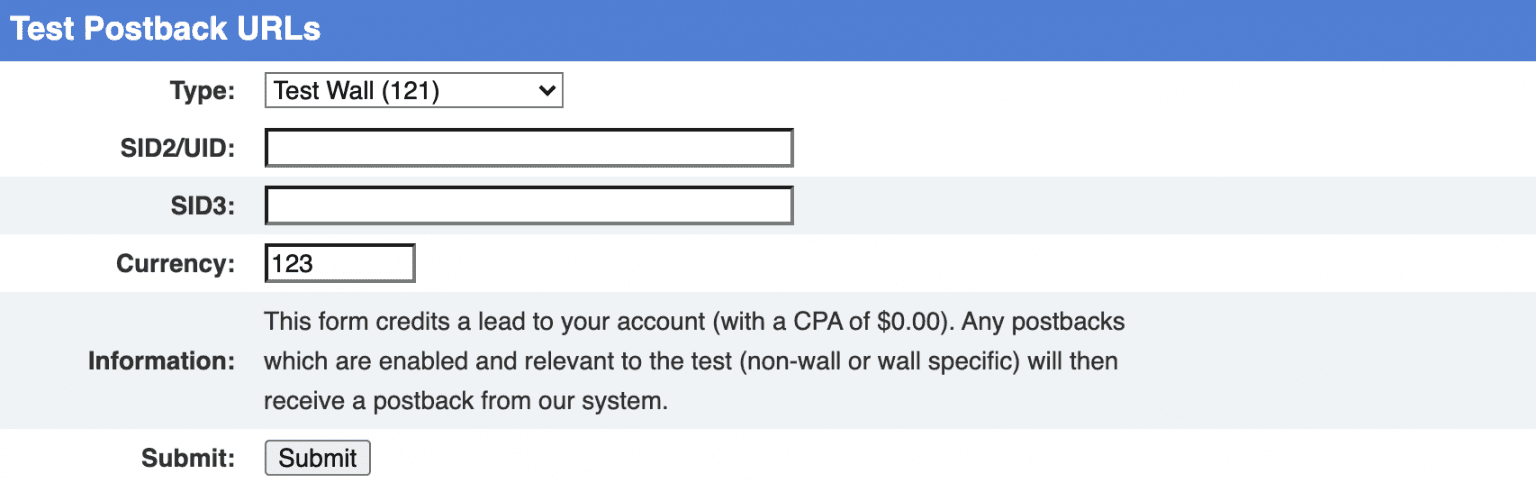
Before going live, use the Test Postback URLs tool in the portal under Configure Postbacks to send a test notification to your endpoint without requiring a real offer completion.
To run a test:
Select the offerwall you want to test.
Enter the user ID in the SID2/UID field.
Optionally enter a value in the SID3 field to pass additional information.
Enter the virtual currency amount to award.
Click Submit to fire a test postback to your server.
Check your endpoint to confirm the postback was received and processed correctly before enabling live traffic.
Share feedback on this documentation