Updated:
Will an Offerwall Get Your App Rejected by Apple?
Apple has never rejected an app for having an offerwall. It has acted three times against things offerwalls were doing. What Guideline 3.2.2 actually says, what got enforced in 2011, 2019 and 2026, and the five implementation details that carry real rejection risk.
Written by the RevU Content Team

One of our top publishers was getting ready to launch their app. They had been running our offerwall successfully on their web platform, and we were waiting for the mobile version to clear review. In a planning meeting, they told us they were glad to run our offerwall on Android, but they wanted the iOS version left alone. Their worry was that an offerwall might get the app rejected by Apple.
It is a common fear, and an understandable one. Years of secondhand advice have taught developers to treat rewarded screens as a fast way to fail review.
So we walked them through the real rules. Will an offerwall get your app rejected by Apple? That fear is mostly misplaced, and the actual risk sits in a narrow, well-marked spot.
Search that question, and the top results are old forum threads warning that Apple bans offerwalls. That fear stops many publishers from adding a revenue stream their users would actually welcome.
This guide gives you a current, plain answer, backed by Apple's own rules. You will learn the exact guidelines that apply and what really gets apps pulled. You will also see how the rules compare to Google Play, and how to add an offerwall that passes review.
By the end, you will know where the line sits and how to stay on the safe side of it.
What an Offerwall Actually Is
An offerwall is an optional screen where a user chooses to complete an advertiser action in exchange for in-app currency. Those actions can include installing an app, signing up for a free trial, making a purchase, or reaching a game milestone.
The user sees the exact exchange before they act, and they can ignore the whole screen. Nobody loses access to the app for skipping it. That opt-in design is what keeps offerwalls inside Apple's rules.
Games, apps, and reward sites use them to earn without charging their audience. For a fuller picture of how offerwalls work, start there.
What Apple's Guidelines Actually Say
Apple's App Review Guidelines never mention the word "offerwall." Compliance comes down to a few provisions about what your screen does, not what you call it. You can read Apple's App Review Guidelines in full, and four provisions matter most for an offerwall.
Rule 1: Don't Recreate the App Store
Apple treats one design as an unacceptable business practice. Guideline 3.2.2(i) lists as unacceptable "creating an interface for displaying third-party apps, extensions, or plug-ins similar to the App Store or as a general-interest collection."
An offerwall that looks like a browsable directory of apps, with install buttons stacked like a store, risks this rule. A wall that mixes varied actions such as surveys, sign-ups, purchases, and free trials does not read as an app store.
In practice, the safest offerwalls look like a rewards menu, not a shopping aisle for apps. When a reviewer sees a list of mixed tasks, the App Store resemblance disappears.
Rule 2: Don't Force Store Actions
Guideline 3.2.2(x) draws the clearest line. It sets what Apple treats as off-limits and what it allows: "Apps must not force users to rate the app, review the app, download other apps, or other store-related actions in order to access functionality, content, or use of the app. Apps may otherwise incentivize users to take specific actions within apps (e.g. completing a level, watching an ad)."
Read the two halves together. The permission clause covers "specific actions within apps," with in-app examples like completing a level or watching an ad. The phrase "download other apps" sits in the forced-actions list, alongside rating and reviewing.
So the most defensible reading is that Apple drew its line at coercion and access-gating. You may reward a user who chooses an action. You may not block your core features until they install another app or leave a rating.
Offerwalls with install offers run at scale on iOS today. An optional offerwall sits on the permitted side. These opt-in reward screens never gate the content people came for.
Rule 3: The Cryptocurrency Exception
One more guideline sounds alarming but rarely applies. Guideline 3.1.5(v) covers cryptocurrency apps only, and it bars them from offering currency for tasks like downloading other apps.
If your app does not deal in cryptocurrency, this rule does not touch you. Most publishers can set it aside.
Rule 4: Don't Be Mostly Ads
One guideline matters for a specific kind of app. Guideline 3.2.2(iii) prohibits "artificially increasing the number of impressions or click-throughs of ads, as well as apps that are designed predominantly for the display of ads."
A real game or app that includes an offerwall is fine. A thin app that is mostly the offerwall is exposed to this rule.
That is why standalone rewards apps carry a risk that embedded offerwalls do not. An offerwall inside a substantial game is one feature among many.
The Times Apple Actually Acted
Across every case below, Apple's objection was never "users are being rewarded." The pattern points somewhere else each time.
2011: Chart Manipulation
In April 2011, Apple began Apple's 2011 clampdown on incentivized-install offer walls, with Tapjoy the prominent operator. TechCrunch reported that Apple was "clamping down on incentivized downloads. Developers who submit applications with these offer walls are having their applications rejected."
The real worry was chart rankings. VentureBeat (April 2011) reported that Apple's stated concern was the manipulation of the top rankings for mobile games on the App Store.
Here is a detail most retellings miss. The 2011 action cited the developer license agreement, section 3.10, not today's Guideline 3.2.2.
Tapjoy CEO Mihir Shah reportedly proposed a compromise Apple declined. By that reporting, he offered a cap so no app could reach the Top 25 through incentivized installs. He also offered a referral URL so Apple could exclude those installs from its rankings.
Apple said no. The complaint was about the App Store's own charts, not the reward.
Apple never reversed course. It kept rejecting the model that paid for installs to lift rankings.
So the providers adapted. Tapjoy scaled back its install offers and capped campaigns so no single app could ride another onto the charts.
Offerwalls carried on through other offer types. The reward mechanic survived, and the chart manipulation was what Apple made them drop.
2019: The Storefront Problem
Over Easter 2019, roughly April 18 to 21, Apple began rejecting apps under Guideline 3.2.2. The target was CPI and CPE offers inside offerwalls, plus web deeplinks. CPI pays for each install, and CPE pays for a deeper engagement like a level or a purchase.
Apps carrying a Tapjoy SDK were rejected in volume, and Fyber and ironSource were also affected. ironSource declined to comment. PocketGamer.biz documented the April 2019 crackdown in detail.
The affected apps were allowed back within a few days. Providers dropped the offending campaign types: the CPI and CPE install offers and the web deeplinks.
Offerwalls themselves kept running on iOS on that basis. Here too the reward mechanic survived, and the storefront-style install offers were what changed.
The revenue stakes were reported cautiously. One industry source told PocketGamer.biz that publishers reliant on CPI/CPE offerwall revenue could expect an iOS revenue drop of 50 to 70 per cent.
Read that against 3.2.2(i). An offerwall that presents a browsable directory of apps looks like a rival storefront. A contextual list of tasks does not.
2026: Marketing and Data
In April 2026, Apple removed Freecash. TechCrunch reported that Apple removed the Freecash app "citing the misleading marketing," pointing to guidelines 3.1.2(a) and 2.3.1, "which forbid scamming users, engaging in bait-and-switch tactics, and marketing apps in a misleading way."
The scrutiny concerned consumer marketing that promised specific earnings, plus reporting about the app's data collection. Almedia disputes the characterizations, and its web product remains available.
Notice what this was. Freecash was a standalone rewards app with its own listing, not an offerwall embedded in a host game. Nothing in the stated grounds concerns the offerwall mechanic.
Google Play followed the next day, on April 15. RevU's own analysis of why Freecash was removed reaches the same read.
Five Things That Actually Create Rejection Risk
Working backward from what Apple has actually enforced, here are the risks worth checking before you ship.
Gating is the only risk the guidelines address directly, under 3.2.2(x); rewards must stay a bonus and never a toll.
Watch soft-gate edge cases too, like an out-of-lives state that pushes users into offers just to keep playing.
A storefront-style layout invites 3.2.2(i) scrutiny, so mix your offer categories and frame them as tasks.
Ad dominance matters under 3.2.2(iii), because a thin app that is mostly the offerwall is exposed.
Earnings claims in your ads, your listing, or paid creator content must be substantiable.
Metadata and screenshots should lead with the product, not with earning.
Did Apple Quietly Okay Offerwall Installs?
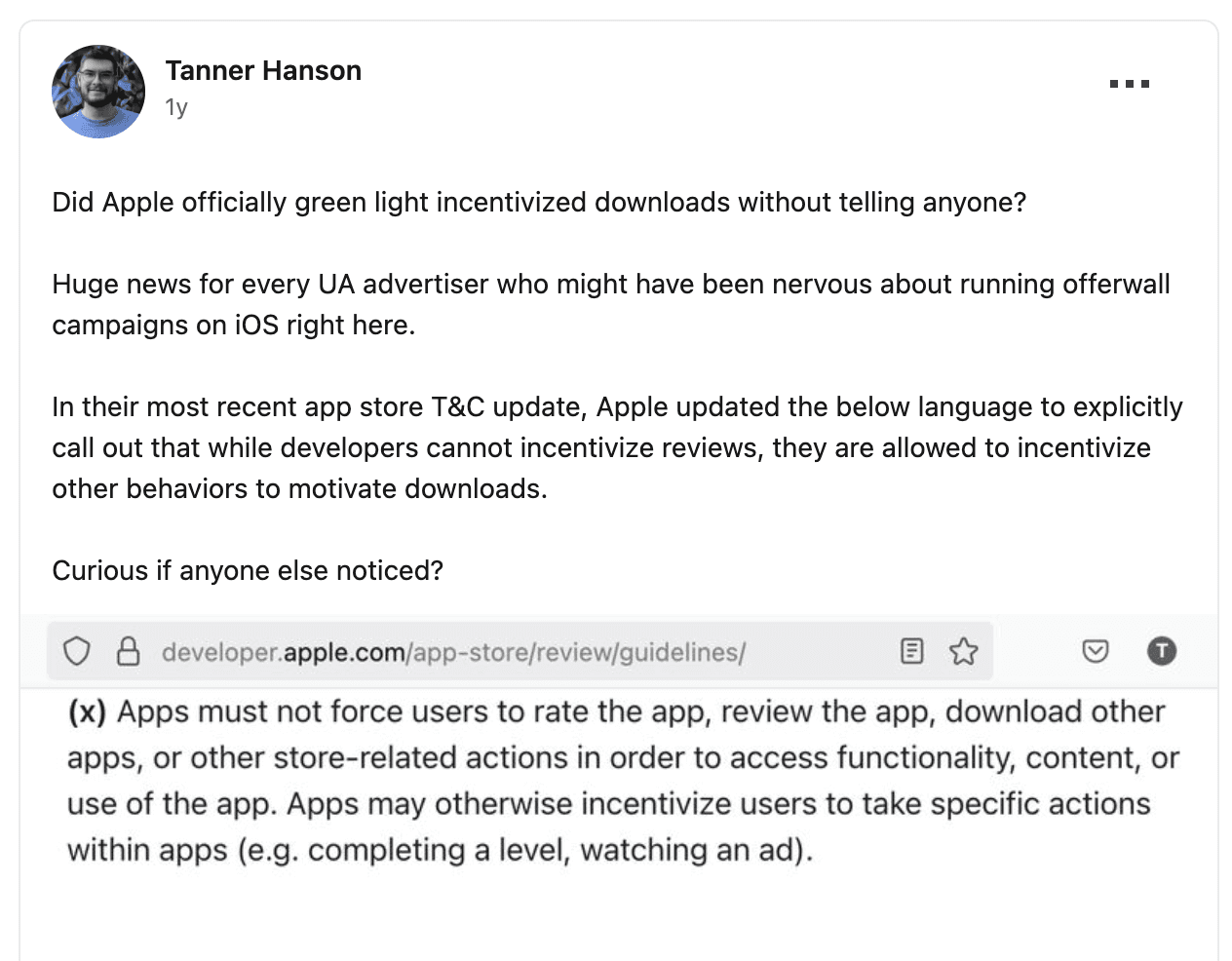
RevU's CEO, Tanner Hanson, spotted a change in Apple's App Store terms. He flagged the change in a LinkedIn post opening with "Did Apple officially green light incentivized downloads without telling anyone?"
This is a significant shift in Apple's policy that clarifies the situation. Apple has updated Guideline 3.2.2(x) to explicitly permit incentivized actions, provided they don't block core app functionality. The update reworded Guideline 3.2.2(x) so it now plainly lets developers reward users for specific actions:
Apps must not force users to rate the app, review the app, download other apps or other store-related actions in order to access functionality, content or use of the app. Apps may otherwise incentivize users to take specific actions within apps (e.g. completing a level, watching an ad).
AI code apps have changed iOS submissions
iOS submissions surged as AI coding tools lowered the barrier to shipping apps. 9to5Mac reported an 84% surge in new apps, about 84% year over year in Q1 2026.
Some developers reported review waits stretching into weeks. Yet Apple's App Review page states that "on average, 90% of submissions are reviewed in less than 24 hours."
Both can be true. The median holds steady while the tail gets worse.
The scale is large either way. Apple's 2025 Transparency Report records 9,100,620 submissions reviewed and 2,093,244 rejected in 2025, most for ordinary reasons like crashes and inaccurate metadata rather than offerwalls.
Here is the takeaway. An ambiguous implementation now costs a resubmission cycle measured in days or weeks. Avoidable questions are more expensive than they used to be.
A rejection is rarely a single event. You fix the flagged issue, resubmit, and wait in the same queue again. Each round can add another week, so a design choice that reads clearly the first time protects your launch date.
Integration Model Changes Your Blast Radius
The 2019 rejections hit apps for a structural reason. A provider's SDK was compiled into the app binary, and the offending campaign types shipped inside it. Developers had not chosen those campaigns and could not change them right away.
The remedy required the vendor to act first. A web-based integration keeps third-party code out of the binary. Offer-catalogue changes then propagate without a resubmission.
This is how RevU integrates, over a web link, an API, an iframe, or a hosted page. Our SDK-free offerwall for publishers adds no app-size or review-cycle overhead. This model is how RevU serves over 6 million active users across 2,500+ concurrent live campaigns without touching the app binary.
The practical payoff is speed. If a reviewer flags a specific offer type, RevU can pull that campaign server-side and the change reaches every user without a new build. A team relying on a compiled SDK waits for the vendor to ship an update, then resubmits.
Developer experience supports the boring approach, as RevU documented in what developers report. Be clear about the limit, though. This is not an exemption. Gating is still gating, and a storefront still looks like a storefront, whatever route the offers arrive by.
Apple vs. Google Play: How the Rules Compare
The two stores handle rewarded actions differently. Here is a quick comparison:
Question | Apple App Store | Google Play |
|---|---|---|
Allows optional rewarded actions? | Yes, when optional and not App Store-like | Yes, incentivized installs are permitted |
Auto-removes for incentivized installs? | No published record of format-only removals | No, but filters them from top charts |
Main risk to watch | App-directory interfaces and deceptive marketing | Reduced visibility in charts and rankings |
Google takes a softer stance. Its Android Developers Blog set Google Play's incentivized-install policy, stating that Google "won't automatically remove apps from the store just because they utilize incentivized installs as one of their user acquisition channels." That post is dated June 5, 2017, so verify the current terms first.
Apple also limits measurement through SKAdNetwork and app tracking rules, which shapes how you read iOS campaigns. RevU's breakdown of iOS attribution limits covers that in depth.
A Pre-Submission Checklist
Before you submit, walk through this list. Each item maps to a concern Apple has actually acted on, so a clean pass here removes most of the guesswork.
Confirm your core functionality is reachable without the offerwall.
Make sure users enter the offerwall by choice, never through a forced interstitial.
Keep the offer mix from being predominantly app installs, and present offers as tasks.
Check that your app stays substantial with the reward mechanic removed.
Remove any unsubstantiated earnings figures from marketing, your listing, and paid creator posts.
Write screenshots and a description that lead with the product.
Know what your provider collects about your users.
Confirm you can reach your provider quickly during review.
The Bottom Line
Fifteen years of enforcement point at a consistent set of concerns. Apple has acted when charts were manipulated and when apps behaved like a rival store. It also acted when apps were mostly ads and when consumers were told untrue things. None of those concerns is the reward itself.
So focus your energy on behavior. Keep the screen optional and your marketing honest. Steer the design clear of anything that imitates the App Store. Do that, and the offerwall becomes a revenue stream you can defend in review.
When you are ready to add one safely, start by choosing a monetization platform built for compliant scale.